In the past, the ERP midmarket customer tended to have to wait their turn — sometimes a long turn — in order to reap the key ERP benefits of technology. Previously, large businesses had the money and the people-power to transform advances pretty quickly; they could make investments where needed, while midmarket customers waited until ERP technologies became more widely available and thus affordable. Today’s quick changes to technology development and agile implementations have upended the status quo; now midmarket companies can grab tech and IT changes that benefit them soon after they’re available.
That’s good for business because it helps midmarket companies grow when they need to scale up their employee headcount or production capacity. However, this sometimes results in doing without upgraded technology to save costs. With a renewed focus on the midmarket, ERP providers need to scale their systems to accommodate the midtier budgets. Growth and evolution are both the cause and effect of an ERP implementation. Companies grow and need new systems and licenses. New systems provide the ability to scale and move to the next stage of the growth lifecycle.
This also means that technology companies would be remiss if they avoided marketing and scaling their offerings to midmarket firms; they’re missing a pretty lucrative set of potential customers. We remember an instance, years ago, of walking up to SAP at a trade show and as soon as they found out we were a mid-market company, they summarily dismissed us. Today, that just wouldn’t happen as the large tier ERP cannot ignore smaller customers.
Significant ERP advantages that the midmarket seek include improved reporting and forecasting, legal and regulatory compliance, and most importantly, improved customer relationships. Besides reduced costs, technology vendors need to focus on advancing the value they bring to the midmarket clientele and continue to align with important improvements that their software tools bring to a midmarket customer.
How does all this play together to benefit midmarket companies with ERP software? This graphic lays out the current key ERP benefits for the mid-tier firm.
[dropcap]A[/dropcap]s you consider your ERP post-implementation activities, remember that almost everyone focuses on the go-live event and at that time considers the implementation complete. However, the real return on investment from the ERP comes from the post-implementation activities that occur within the first year. It is a sad fact that most ERP teams disband after the go-live. Ideally, the team remains, if even for on a part-time basis to continue the excellent work that led to the successful go-live. Many books, blogs, articles, and other resources focus on the Technology aspects of the Post ERP Implementation activities. They fail to address the People and Process aspects of ERP after the go-live.
The first year after the ERP implementation is imperative in determining the long-term success of the system. Many post-go-live activities need to be both planned and executed after the launch. Performing a post-implementation review, transitioning the consultants, determining the governance strategy, continued training, and other activities ensure on-going success of the ERP solution.
When to plan for your post-implementation activities?
Ideally, around the time you are running your User Acceptance Testing (UAT), or earlier, you should be putting together your post-implementation strategy. Don’t wait until the week of go-live to ask “Now what?” Just as you had a project plan to execute on the design, build, test and roll-out of the ERP Project, you must put in place a post-go-live plan. The plan should address the People, Processes, and Technology of the operational ERP environment. Let’s discuss some significant ERP activities in those domains:
People:
Post-implementation review – capture the wins, learns and changes
After the go-live event, ensure that the core team meets to discuss what was successful about the implementation, what did we learn from the project, and what would you change going forward? The team must document theses “wins”, “learns”, and “changes” (WLC). Include a WLCs review session when planning out future initiatives. Develop a practice of incorporating this knowledge of your projects into the future project planning activities. It is our experience that these sessions provide valuable insights into not only how the project executed, but the perceptions of the team members on what worked and what didn’t work. Writing down these discussion points will help you on future projects.
Transition the consultants
You likely had a team of advisers from your implementation partner involved in the ERP deployment. Once you are live on the new system,
ERP Post-Implementation Activities
request their updated implementation documentation. Key documents such as a solution design or technical design need to be updated and delivered to you as a reference document for future changes or troubleshooting issues.
Additionally, in your contract with your consultants, did you include any post-go-live support hours? Is the internal team who will support the ERP system adequately trained and able to assist the users with technical or process questions? Use some of these hours to ensure that there is a skill and knowledge transfer.
Quarterly review training
A fundamental way to make sure that you get the adoption you desire from the ERP system is to initiate quarterly refresher training classes. In the first quarter after go-live, it should be simply a refresher course. But as you continue, you should dive into deeper functionality that will help the users in their tasks and expand their knowledge of the software. Always communicate the “What’s in it for me” benefits to the users before go-live. If you didn’t do that, this is a perfect time to remind them why they should be using the system to the fullest and how it will help them with their jobs.
These refresher classes may be in person, but many companies are now using online training courses. Allowing users to view videos of the classes or take self-guided training are excellent ways of providing system reinforcement training. Keep these training classes going and archive them. As there is turnover in your organization, new users will appreciate the catalog of past courses they can reference.
Processes:
Capture the knowledge
As mentioned above, it is important to capture the system expertise of the consultants, but it is equally important to ensure that you have sufficiently documented the new processes in all areas of the implemented system. Typical processes you should include in your documentation are the Order-to-Cash cycle and the Procure to Pay cycle. But even the GL Posting process and the inventory cycle counting methods should be documented. Capture decisions made during the project so that in six months to a year when everyone has forgotten the implementation cycle, that you have a reference as to “why” you expect people to operate in a particular fashion.
Many ERP systems have a useful life of 5 years or so because the people who implemented the system have typically moved on to other departments or have left the company. That leaves a knowledge gap, so arbitrary decisions get executed without understanding the initial considerations of “why” the system was setup the way it was. Documenting the processes and significant decisions will help extend the life of the ERP solution. Yes, the system will evolve, but as you grow the system, you should create a written knowledge of the how and why considerations. Future decision makers will be more informed and will have an understanding of the original vision for the system.
Documenting the processes and decisions points may seem like a lot of extra work, but in the scope of a million dollar or 50 million dollar investment, it ensures that that investment will continue to provide a return.
Post-implementation process review
Performing a post-implementation process evaluation provides a checkpoint and validation to your original implementation assumptions. One or two months after go-live, the implementation team (or a key subset) should work with the users who are using the system to ensure that the setup for the system matches with the end-users expectations and that there are no bottlenecks for the users to get their work done. Often, the initial ERP implementation team includes a representative who makes process decisions based on his/her understanding of their business unit’s methods. As much as they may try during the implementation, they may miss key process requirements from other similar business units. An example is having a person representing the purchasing group in the United States, miss the requirements his/her colleague has in the United Kingdom. They may have made some assumptions about a common process, but missed the detailed requirements for the partner business unit. This misalignment should be remedied as soon as possible. If there are gaps in the alignment between processes and the system, a user story (an agile user requirement) should be documented and added to the backlog for system enhancement.
Providing a post-implementation review, provides users with a feedback mechanism and also provides a way of catching issues early, before they lead to significant adoption issues, such as abandonment by the affected users. On a continuing basis, a business analyst should work with the user community to ensure that there is a perpetual alignment of the system to current processes.
Technology:
Post-implementation backlog review
During the implementation, requirements are captured, but often there are some user requests are not fulfilled during the initial deployment. These may be out of scope, nice-to-have requests, or items that are not feasible within the timeline defined. As such, a request backlog is collected. The backlog of requests should be reviewed post-go-live to determine the appropriate time frame in with which to deliver. In some cases, the requests are deprioritized. Alternatively, some user stories are put into the next release cycle. Many companies today are working with an agile process for delivering on these requirements. In addition to user requests, there may be additional systems to integrate with, other, non-critical data to load, or even standard software maintenance releases to apply. All of these should be planned for and put into a structure that allows for on-going innovation of the ERP system. This delivery is often part of a governance plan.
Establish your system governance structure
Do you have a process in place for managing changes to the ERP system? How will you capture ongoing user feedback and requests for enhancements? How will you adjudicate the priorities and conflicts in requests? How will you manage your backlog of user requests?
Many IT departments have processes in place to solve users issues. But these traditional IT tools and methods do not necessarily handle the request backlog for an ERP system. Most importantly, they do not always tie back the functionality to the original request (or “user story”). There is a class of software that is used to manage these issues called Application Lifecycle Management (ALM) software. Using a quality ALM, your IT team can both manage and document the user stories (requirements) and provide traceability from system functionality to the original request.
Aligning user requests is a major component of a governance structure. Think through how you may harmonize conflicting enhancement requests. For example, one division may want to rename a set of fields to accommodate the way they do business, but in doing so, it may break another groups’ way of operating. When establishing a governance structure, initiate a method of judging and aligning requests. Sort out how to break logjams of conflicting priorities. All-in-all, it is necessary to plan out how you manage, harmonize, build and deploy changes to the system.
Begin execution of an on-going maintenance plan
ERP systems need care and feeding. As mentioned above, there are usually quarterly or semi-annual releases of software updates. These need to be scheduled and deployed appropriately, without significant user interruption. Along with vendor updates, new functionality developed internally needs to be prepared and released. A release cycle needs to be developed. How often and when will you release new features to the user community? More importantly, how will you communicate the new features and will any of the new software capabilities require user training? Can this be timed with the quarterly update training, or will special sessions need to be scheduled? Keep an eye on development capacity. You may only have a handful of resources who can implement the ERP changes. They may already have their hands full managing the system and preparing for vendor enhancements. IT must provide feedback on capacity back to the business stakeholders. Clear, open communication should be part of any governance plan.
System evolution planning
Lastly, keeping the ERP system fresh and evolving will continue to allow the business to operate at peak performance. Re-orgs, acquisitions, divestitures, and other business management activities will add new complexity or challenges to the ERP software maintenance. Where possible, have regularly scheduled executive meetings focused on system direction. When you began your deployment, you likely had a functional team working on the details of the system and process alignment, and you had an executive steering committee providing guidance and direction. These groups ideally should remain and continue to offer improvements and directions for the evolution of the ERP system.
ERP Post-implementation activities summary
We have defined here a high-level list of activities that a medium-to-large organization may wish to focus on post-implementation. This is not an exhaustive list, but should start the conversation about what to consider and plan for after the ERP go-live. Please comment below if you have other activities that should be included after the launch of an ERP system.
Key Takeaways:
[box type=”info” style=”rounded” border=”full”]
Consider your users’ reality and needs through appropriate, on-going training and communication
Plan for continuous system changes that include user requests, vendor updates, internal changes, and a deployment cycle
Document and manage process changes, especially as you move forward with your new ERP system
The riskiest part of a project comes in one of two areas, the integration with other systems, (especially where you have near-real time transactions) and most critically, the ERP data migration. You can build out your processes in the system correctly, you can ensure that all the reports are spot on and you can properly train your users. However, if your ERP Data migration does not execute flawlessly, then you are going to have unhappy users and a failed implementation. Since this is a critical part of any implementation, let’s look at some key data concepts and areas to watch for to ensure that you have a good understanding of the migration process.
The key concept you first need to understand are the two types of data that you and your team will be dealing with. First, there is the Master Data records. This is the data that infrequently changes and is the core of the system records. Records such as Companies (Vendors and Customers), Contacts, Inventory Items, Bills of Materials, and GL Accounts are all Master Data. All other Transactional Data relies on the Master Data.
The second type of records is the Transactional Data. Orders, Purchases, Work Orders and the like are your Transactional Data. These are your day-to-day transactions. As mentioned, these utilize (or link to) the Master Data to create a complete record. It should be obvious that you want to ensure that the Master Data is clean and loaded first before you load the Transactional Data.
Build a Data Plan
The key to success is proper planning. Before you embark on a data migration it is important that you catalog all of your data sources that you will migrate. These should be part of a comprehensive data plan document. Key things that should be included in your Data Plan are:
Working the weekend on an ERP Data Migration.
Data Inventory
Source Tables
Target Tables
Record Counts
Data Mappings
The data migration tool(s) to be used
Any data consolidations
Transformations (moving the data record fields from one format to another to accommodate the new system)
Data cleanup activities
Testing Plan
Cutover Plan
The Data Migration Process
Profile the source system to identify the data relationships, including the current state of data quality and any discrepancies that exist between the source and target data model.
Perform a data mapping exercise with the owner of the data. The output of this exercise will be a data mapping workbook that contains granular field mappings and transformation/normalization rules. It should also include the sequence of data table loads due to the dependencies of the data relationships.
Extract a sample dataset from the source system into a sql database to be manipulated prior to loading. A flat file CSV format can be used, but then the file needs to be cleaned manually using a spreadsheet software.
Use an Extract, Transform, Load (ETL) Tool and a sql server staging database to perform the transformations, clean up and load of the sample data into a test environment. An iterative approach should be used to fine-tune the rules and process.
Validate sample data in the test environment using the following methods:
Mapping validation
Match reports and record count validation
Correct any discrepancies identified in the validation process
Perform a User Acceptance Test (UAT) on the data in a test environment and receive a sign-off from the business owners
Extract a “delta” or net difference extract from source to collect recently transacted data
Migrate data with modified logic into the target system
Validate that the final data migration was successful
Execute a data quality plan and de-duplication in production instance
Go Live
Update your documentation with any last-minute changes
Working through your ERP Data Migration
When planning your ERP Data migration, some things you should consider:
How much data do you need to bring over? Typically, you will bring all of your master data, but maybe only two years of transactional data. This could vary on a table-by-table basis. For example, you may want to bring over five years of customer orders, but only two years of purchase order data.
Can you archive your older data into a database that can still be accessible if needed, but not needed in the ERP?
Will the old system be available or is it completely going away? If the old system is still available, then perhaps you do not need as much transactional data migrated. The old system could be available in a read-only mode. If you are migrating from a licensed system and you are shutting off the licenses, then moving the legacy data to an SQL database or data warehouse is probably the better solution.
In your data cleanup, you may want to enhance the data using third party sources, such as Dun & Bradstreet’s company information. This should be additive and not replace your core data.
In summary, it is critical that you have a really well-thought-out plan that addresses not only the migration but also built-in contingencies. Is there a rollback plan? Then, once you are in the migration, be sure to run a significant amount of tests on the data to ensure it is valid data, it is properly mapped to the correct target fields, and that the sequencing of the data is carefully considered. Once tested, make sure you have a go-live validation to ensure that even the well-tested data came into your production environment correctly. This should happen prior to the users being allowed into the production system.
If all goes well, the users will notice only surface level things such as the new systems user interface. The underlying data should feel very much the same to them. If you have any other tips or suggestions on making an ERP data migration run smoother, please comment below.
When selecting an ERP software solution, you need to be looking at the possibility that your company will be using that system into the future for at least 10 years. In some cases, we’ve seen systems that are 15 to 20 years old. A lot depends upon the industry you are in and the nature of the business leadership. Are they conservative or do they accept new innovation well? In either case, an ERP purchase decision will have a lasting impact on the company. If you are looking to upgrade to new ERP software in the next year, you will likely miss out on some of these new innovations, unless you remain current on all update releases.
Two questions to ponder: What exactly does the future hold for the ERP market and how can you acquire software that will take you into the future? Will you select an ERP that is rooted in the past and will it leave you in the 1990’s?
To help you think about this, here are seven predictions of what will be coming with ERP solutions in the next 10 years:
1. Mobile ERP everywhere
A recent Yahoo Finance Article stated that “The number of smartphones in use in the third quarter of 2012 totaled 1.03 billion, a 47 percent increase from third quarter 2011. Nokia introduced the first smartphone in 1996 and it has taken the smartphone industry 16 years to top the 1 billion mark. By 2015, the research firm predicts that number to double to 2 billion.” Essentially, everyone in the developed world will be on a smartphone. In 2012, Cisco’s CEO stated “…the number of internet connected devices reached 8.7 billion in 2012.” Workforces are becoming more distributed and mobile is the way that you link everyone together.
Because of these staggering numbers, it is clear that the smart device (phones, tablets, watches?) will integrate more and more into what you do both at home and work. Smartphones come with apps…lots of them. Imagine your ERP being run by a smartphone app. No matter if you are on the shop floor, or in a board meeting, you will have access to the ERP data and can transact from your phone. Further, you will have access to tablets. Whether it is a next generation iPad or a Nexus tablet, you will have mobile capabilities to use your ERP software wherever you are.
More amazing is that there is a concept of “smart things” or devices that are smart enough to know about other devices nearby. Near Field Communications (NFC) allows two devices to communicate and transfer data so long as they are within a few inches of each other. This is being put to use in point-of-sale systems and it works a lot like RFID, except that you have two devices communicating with one another instead of just one. This could mean that a shop manager could walk up to a production system with his tablet and immediately, the tablet would show him the job that is being worked, the rate of processing, and the expected end time. It could also show the current work queue along with other data. Further, you could have a parts batch that arrives at a station and based on proximity, it would tell the operator on their tablet the information about the job as well as the devices auto clock-in to the job. RFID does some of this now, but it is going to get a lot smarter and a lot more interactive.
2. ERP Cloud everywhere
Cloud computing is expanding. A recent announcement, such as Oracle and Salesforce to combine clouds, just shows that cloud-based data will be even more accessible. ERP is moving to the cloud. Companies such as Salesforce.com, Netsuite, Kenandy, Intacct, Workday and others are leading that charge.
What about traditional ERP? Yes they too are moving to the cloud, although it may be a hybrid cloud solution. Having a private cloud that seamlessly links you to your legacy ERP data will be the next wave of evolution for traditional ERP vendors such as SAP or Oracle. This two tier solution is already here with the Oracle and Netsuite’s agreement.
ERP will become more distributed. No longer will you have one gargantuan ERP solution. You will take bits and pieces and have standardized interoperability between all the components. Most of which will be in the cloud due to its scalability, its easy deployment, and its connectivity to mobile devices through portals and mobile presentation profiles.
Another advantage of the cloud is frequent updates from the vendor. Quarterly or semi-annual updates to the software are done and you never are bothered. There are no more islands of isolation because you didn’t’ upgrade. You are now current with every other deployment of that ERP Software.
3. Deeper ERP Analytics: the future of ERP mash-ups
With computing power growing to the point exceeding human brain capacity, analytics will be broader and deeper. Obviously, you will be able to mine the corporate data faster and easier. But you will be able to quickly include industry data, supplier data, and other data sources from outside your company in your analysis. Today there is the ability to do “mash-ups” of data. This is more of a web-based technology, but it is going to become part of the day-to-day analytics packages of your ERP solution. To quote the Wikipedia article: “Enterprise mashups are secure, visually rich Web applications that expose actionable information from diverse internal and external information sources.” This is going to be coming to your ERP software solution; native mash-ups of commercially available data.
Additionally, data supplementation will become a standard feature of the new breed of ERP systems. Salesforce is doing that with Data.com. They provide the supplementation of your company and contact data with data acquired from Dun and Bradstreet, with automated cleansing of your data. ERP will move into this space as well.
4. ERP modules as Apps
Following the premise of Apple’s AppStore, enterprise solutions are going to be providing functionality as add-ons that can be leased or purchased from an AppStore. The wonderful thing about on-demand apps is the ability to expand your system as the business requirements dictate, based on thousands of other implementations. Previously, you may have had custom solutions that were unique to your company and you never got to see what other brilliant ideas someone had for expanding the same ERP system. In the near future, you will be able to leverage other’s expansions by way of custom “apps” that will plug in to your instance.
Salesforce is doing this with its AppExchange offering. You have an implementation of Salesforce and you want to extend the functionality or take advantage of predefined functionality that some vendor has provided for their customers, so you go to the AppExchange and quickly download (with a few clicks) that enhancement app to your system. Some are managed and are automatically updated and some are not and will remain as static functionality.
5. Social ERP
Just as Facebook and Twitter have revolutionized how we interact and discuss things, social media is the wave of ERP in the near future. Again, using Salesforce as a model, they rolled out their Chatter product a couple years ago and it has revolutionized the CRM space. Microsoft has acquired Yammer. You can be sure you will see aspects of it in the ERP products such as Microsoft Dynamics NAV or Dynamics GP. What makes social within a business system unique is that you can have a conversation around transactions. Let’s use the example of an ERP. You have a significant work order for your largest client. But there is a parts shortage. People who follow that customer can then see a post – by the system – that there is a problem. A conversation has started. The executive sends an @”manager” message to the line supervisor. He responds to the issue and everyone who is involved with that customer can see what is going on. The @”salesperson” walks into the client’s office for another reason, but beforehand checks the social feed and realizes there is a problem. He lets the customer know that the production is going to take a couple days longer than planned. Because it is early, the client can respond. All of this has just happened in the matter of a few minutes. But it has prevented the typical problems of a late shipment, because everyone involved in the customer account had visibility into the conversation. Pretty amazing!
6. ERP Gamification
Gamification is not as childish as it sounds. Gamification puts incentives on the “players” (aka users) to reach the next level, or accumulate points to earn some reward. Applied to business systems that can mean that users get rewarded based on the amount of transactions they process, or they solve business problems in such a way that they receive awards. Many businesses are likely opposed to gamification simply because the leaders are from a generation not centered on the computer and video games. A key point to consider is: “Generation Y or Gen Y refers to those born from the early 1980?s to the early 2000?s. This generation grew up with video games. They expect immediate feedback and they are willing to take risks and endure ‘epic failure’. They have 10,000+ hours of experience of video gaming experience under their belts.” (from Gamification at Work) The current workforce is programmed around gaming. They are looking for the virtual challenge. Redundant transactions, such as A/P vouchering, are mind numbing to young people who grew up with high velocity gaming on their computer screen. But if you put incentives in the ERP system to accurately complete batches of transactions and you get points that accumulate to prizes, you make the software much more interesting and appealing.
7. ERP Interfaces will change
With the arrival of touch screens and eye scanning, there is a new wave of system design that is focused on the human interaction. The mobile phone is leading this revolution with eye tracking built into the phone that performs certain functions based on how the eyes are moving. Tablets and touch screens have already been mentioned, but they will become as small as sheets of paper.
The interface for an ERP went from punch cards, to green screens, to GUI (graphical user interfaces), to now touch and gestures. These new interfaces will start with the mobile devices as mentioned above, but will soon make their way into standard ERP screens for users. Imagine a purchasing clerk waving her hand at the screen to scroll through open POs. Or, imagine a GL accountant using their finger to scroll through postings. We are moving away from the GUI interface and into touch, gestures, motions and voice interactions with the computer. Developers will come up with new ways to utilize these tools, but they will soon be upon us in the ERP software space.
These are some of the advances we will see coming to the ERP market in the next ten years. There are likely some that will be invented five years from now that we know nothing about, but will be revolutionary. The real question here is how fast current ERP software can move to these new advances. Additionally, how soon will your company upgrade to include these new technologies? The likely answer is not until your next major ERP implementation. Some of the features will roll-out with updates, but more than likely the ERP software you use will not be upgraded for five to seven years from now, depending upon how old it is. So realistically, these new technologies may take up to ten years to become a mainstream part of life. We are interested in hearing your views on the next ten years in the ERP space. What do you think? Comment below and let us know.
Reading it, you understand why so many ERP projects fail. It seems like that is all people talk about are the failures in ERP project implementations. Is it really the consultant who makes it fail? I think the real question is “who really runs the ERP implementation”.
If what you read in the above mentioned article holds true, then there should not be any successful implementations. I take a different stand and believe that most ERP consultants, and their firms, are trying to do the right thing, there are, however, circumstances that derail a project. Further, I believe that it is the customer’s responsibility to stand up for their rights and protect their investment.
When initiating the project, it is important that the project team interviews each of the consulting team’s staff-members around their experience and their ability to deliver in the role slated. If at any point in the project, you feel that any of the consulting team members are not performing or are being difficult to work with, bring it up to the consulting project manager or the firm’s account manager. They have a vested interest in you getting along well with the team so that the project runs well. Sometimes success or failure is a matter of personalities.
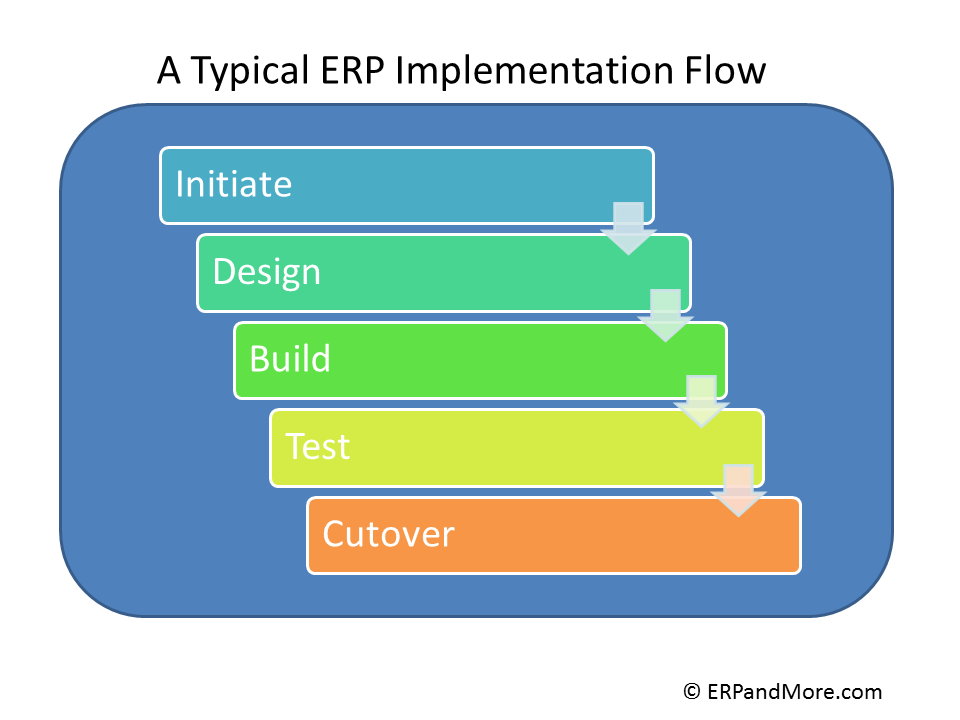
Frequently, ERP implementation projects are run by the consultants who drive it based upon a methodology that has worked for them in the past. It is usually a derived form of Initiate, Design, Build, Test, and Cutover. These five steps have been used in variation for decades now. The methodology has moved from being a rigid waterfall method to a more agile iterative approach, but it still follows the same theme.
If consultants follow the same methodology (in one form or another), why do some projects go well and why do some fail? I believe the answer lies in the project governance. Who manages the project? Who takes ultimate responsibility? What is the culture of collaboration? These are all key questions that need to be addressed before the first day of the project and readdressed along each status meeting.
My experience has shown me that projects that go well are the projects where the client “owns” the success of the outcome, along with the consultants. If the client is not “bought into” their own success, then how can the consultant drive the project to success?
At the same time, there needs to be collaboration. The value of consultants is the experience they bring in executing implementations over-and-over. The consultants will tend to drive the project based on their methodology and their experience, however, the client needs to step up and ask “why?” and “how?” Then they need to assess if it is a sound direction. They need to either accept the recommendation, or push back if they think it will not work for their company.
A professional consultant should listen and explain their reasoning. It should not turn into an ego-fest of who knows best. Rather options and solutions should be presented. A lot of this collaboration depends also on the people involved in the project. Within the same implementation team, you may have a driver style personality who sees all client requests as out-of-scope and must push for a change order. At the same time you may have collaborative team members who gets what the client is asking and realizes that the request is part of the iterative process of reaching a desired solution.
A skilled project manager negotiate with the different personalities and must make the decision to determine where the solution is going. Is it outside the bounds of the work agreement? Or, if by following that path, will it lead to a joint success. This can only be reached through meaningful discussions.
There are consultants who focus too much on billable hours and not on client needs. There are other consultants who focus on client needs only and as a result blow-up the budget. In both cases, the client needs to call foul if they see project effort going too far in the wrong direction.
On a recent project, a client realized that the technical development was over engineering the solution. The client is not technical, but could see that the solution presented was too much for the goal. Working with the consulting project manager they refocused the team and got things back on track.
Bottom line, if you as the client are not collaborating, and working through issues daily with the implementation consultants, you will be driven to a solution that is not one of your own choosing. On the other hand, if you drive the project with too much zeal and force, you may miss the valuable design experience that the consultants bring.
The success of the ERP project weighs as much on the internal team and their project manager as much as it does on the consultants. Where projects go bad, it is often due to the lack of participation of the implementing company’s team or the lack of direction from their project manager. In these cases, the consultants end up driving and will likely make system decisions based on experience, but not based on the operations of the company. So if you want to have success in your ERP implementation, you must own the project and work collaboratively with the consultants each and every day.
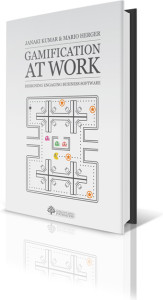
I am familiar with gamification already, as we use Bunchball to gamify Salesforce.com. It does work from a subtle psychological incentive to get us to use the system more. So when I received this book, I was curious to find out what they had to say about gamification and how it could be incorporated in to other Enterprise systems such as ERP.
The book is written from the perspective of gamification in the SAP user community. How they were able to increase adoption within the SAP community and what steps where taken to enhance the users experience. I would have liked to see a book on how it was applied to a proper ERP system, but that is probably the future sequel.
The book itself delves into why companies should develop gamification based business software, it then talks about how to layout the road map for a proper gamification deployment. There are many warnings against taking a “chocolate covered broccoli” approach of simply adding points and badges to business applications and calling them gamified. That aside, it is an interesting study in not only gamification but also proper development approaches to software. Key being to take a “Player”- centric (not user) approach to the software design. They provide a quote from Gartner that states that “in the next two years that 80% of gamified software will fail to meet business objectives due to poor design.” Quite an astounding statistic, but if you realize that gamification is in its infancy you can see why. This book is trying to set people on the right path to success.
Many businesses are likely opposed to gamification simply because the leaders are from a generation not centered around the computer and video games. One key concept that resonated with me was “Generation Y or Gen Y refers to those born from the early 1980’s to the early 2000’s. This generation grew up with video games they expect immediate feedback and they are willing to take risks and endure ‘epic failure’. They have 10,000+ hours of experience of video gaming experience under their belts.” Aside from the redundant grammar, this point makes you stop and think about just how the new workers that are becoming a mainstream part of today’s companies are looking at the systems they use. It is becoming an imperative to design systems that work the way they like to play!
Further, there is gamification going on all around you, the book cites examples such as Linkedin.com and even the Toyota Prius as leaders in gamifying the user interface. Yet it is likely that the users are not even aware of the processes at work, encouraging them to use and engage with the systems. When you start looking at the software tools you use, I bet you can count a number of them that have badges or awards, or some other incentive such as a progress bar to encourage you along.
The book introduces topics such as player types and personas, which are similar to web development techniques, but I don’t know how much they are part of enterprise software development. The discussions in the book around the development process are not necessarily new, but they show how they should be player focused and what that means. For example, there are different motivators that will drive users. Development needs to focus on these motivators as a way to encourage and support user activities. The key takeaway is the understanding of human motivation and how what you build in the software will drive the adoption of the software.
Gamification in Enterprise Software reintroduces us to the mechanical elements of a gamified system. Badges, awards, points, levels, are all part of these systems. However, just by using them does not make for an easily adopted system. The book discusses how users engage with the systems through the mechanics and their motivations. As players progress, there needs to be accommodation for expertise and “leveling up.”
The book also lightly touches on the legal and ethical ramifications of building gamification into enterprise software. Key point here being that the software may be deployed in a number of countries with different laws and cultures. All of these potential pitfalls need to be accounted for and planned into the system.
Finally the book provides real-world examples of how the design process works, including story boards, and business flows.
All-in-all, I enjoyed this book. It goes deep enough into the topic to give you a good understanding of what needs to be considered when thinking about applying gamification to a business software, but it is light enough to read fairly quickly. It can be a good reference book as the chapters are segmented into logical parts. My only complaint about the book is that there it lacks a connective flow in some parts. This could be because it is well outlined and the sections seem fairly stand-alone. In some parts they do not flow to the next section easily. That is a structural concern. The content provided give an excellent understanding for all the aspects of gamification and what a business or development manager may need to consider when planning a gamification project.
I recommend that if you are thinking of applying gamification to a system, or are looking at a system that comes gamified, that you read this book. We are in an early stage of applying fun and motivation to otherwise dry business software, but it will be a considerable aspect of systems in the next couple of years.
Ref: Kumar, Janaki Mythily and Herger, Mario (2013): Gamification at Work: Designing Engaging Business Software. Aarhus, Denmark, The Interaction Design Foundation. ISBN: 978-87-92964-06-9.
Kenandy Manufacturing Cloud Software offers manufacturing management built for the cloud, which includes inventory management, production, purchasing, MRP and cutting edge supply chain collaboration through Force.com, salesforce.com’s enterprise cloud computing platform. Kenandy offers manufacturers a versatile global system, which is both mobile and scalable. Kenandy focuses on providing a system that can be easily and quickly implemented.
One of Kenandy’s key features is that it is always up-to-date, which eliminates the pressure of expensive upgrades. Another advantage to using Kenandy Manufacturing Cloud Software is that there is no additional software or hardware to purchase. Kenandy offers a lean and agile solution for small to midsized manufacturers that can be implemented within weeks. Kenandy Manufacturing Cloud Software is a secure and on-demand application that is easily customizable to meet the needs of several manufacturing segments – apparel, electronics, industrial machinery and more, as well as several modes – discrete, MTO, mixed mode and light assembly.
Kenandy Manufacturing Cloud Software provides a complete system which focuses on the commonalities of most manufacturing features. Organization can have a simplistic, yet powerful solution that can easily be extended by leveraging the additional features through Force.com. There is no need for after-hours batch jobs, as MRP can be run at any time. Kenandy Manufacturing Cloud Software is built on a data model that is fully integrated. Imagine entering POs, reviewing work orders, and updating BOMs, all quickly and easily from a single screen.
Kenandy Manufacturing Cloud Software is built natively on Force.com, which allows it to be easily integrated with an Organization’s existing shop floor or associated accounting applications. Kenandy’s mobility is unrivaled, as it supports accessibility from iPhone, iPad, Blackberry, and Android. Imagine on-the-go approvals, stock room kitting and more!
Built on salesforce.com’s highly evolved cloud computing platform, Kenandy Manufacturing Cloud Software offers a secure and scalable application that will pave the path for innovative manufacturers.
Kenandy Manufacturing Cloud Software Video
Here is Kenandy’s introduction at Salesforce.com’s Dreamforce Event last November:
Kenandy Manufacturing Cloud Software Features
Kenandy Manufacturing Cloud Software focuses on five distinct features: Inventory Management, Engineering, Purchasing, Production, and Requirements Planning.
Inventory Management
Kenandy provides an overview of that gives manufacturers complete control and tracking of their resources. This unique overview includes the maintenance of sub-inventories that specifically support distributed operations, and visibility of upstream and downstream inventory. The lean yet powerful software gives a single screen that allows direct access to a holistic view of any item, which includes inventory locations, open purchase orders and work orders, shortages, MRP plan requisitions, assemblies, order forecasts, recent transactions, manufacturing cross-references, and cycle counts. Kenandy Manufacturing Cloud Software can then add or maintain the item master, add and maintain inventory locations, track the movement of items and assemblies, monitor inventory status, track lot, serial, and batch numbers, and manage nettable items. Kenandy makes inventory management simple and accessible at your fingertips.
Engineering
Kenandy Manufacturing Cloud Software provides an effective method of managing product designs, production information, product change orders for Bills of Materials, engineering changes, work orders, and shop floor routing. Assemblies can be managed from one screen, which allows for quick access to design documents and ECOs. Kenandy Manufacturing Cloud Software makes it possible to cover the lifespan of entire product, from design through production.
Purchasing
Kenandy Manufacturing Cloud Software provides rich functionality in managing the purchase of inventory, as well as asset and expensable purchases. Kenandy completely integrates with your financial system, making it a simple and single point of PO entry and approval. A simple, integrated screen provides access
purchase orders, line items, and approval information, making the experience easy, yet efficient. MRP can also drive purchasing, and Kenandy can streamline this process through your enterprise.
Production
Kenandy makes it important point to streamline your enterprise through a lean operation. Kenandy allows for a simple and easy method to move work orders into work-in-progress with complete control and tracking. Kenandy Manufacturing Cloud Software is offered on a multitude of mobile devices, including iPhone, iPad, Blackberry, and Android, which always puts you in control.
Requirements Planning
Kenandy alleviates the tedious after-hours batch processing of ERP systems, which is prone to failure. Kenandy provides an agile and lean system that rethinks MRP processing, and takes advantage of on-demand availability of larger memory and disk storage. Kenandy MRP is significantly faster and efficient, providing more opportunities for you. Kenandy MRP opens up the possibilities for you by providing simulators. With Kenandy Manufacturing Cloud Software, never again take a late-night call to recover from a failed batch job or miss a critical planning window.
Getting Kenandy Manufacturing Cloud Software Pricing and More Information
If you would like more information on the Kenandy Manufacturing Cloud Software, please select one of the two options below:
We ran across this article today on how SAP is one of several vendors who you can port to the cloud. It is interesting in that the article points out that while SAP does not need to run in the cloud, you can run utilities to offload the heavy processing of SAP to SAAS providers. One would assume that that would be the like so Amazon Web Services or similar.
SAP itself is definitely not a cloud application, but many might have you believe it is. This is common in many ERP solutions where they say that it can run “in the cloud” and they rely on an old ASP model where they are hosting the solution for you. To you it is “in the cloud” but in reality it is just at a server somewhere accessed via the internet.
True cloud computing, such as Netsuite or Salesforce means multi-tenant architecture, a global content delivery network and distributed computing power. So when you are looking at ERP in the cloud, be sure to find out the true structure of the providers’ cloud.
As the name suggests one of the key factors of 'Enterprise Cloud' is that it's intended for the enterprise market, in particular the enterprise applications that they use such as SAP, Oracle and JD Edwards amongst others.


 after the go-live.
 have a useful life of 5 years or so because the people who implemented the system have typically moved on to other departments or have left the company. That leaves a knowledge gap, so arbitrary decisions get executed without understanding the initial considerations of “why” the system was setup the way it was. Documenting the processes and significant decisions will help extend the life of the ERP solution. Yes, the system will evolve, but as you grow the system, you should create a written knowledge of the how and why considerations. Future decision makers will be more informed and will have an understanding of the original vision for the system.